

Website Design Tips

10 Things That Matter When Designing a Business Website

10 Things That Matter When Designing a Business Website

Website Design Tips

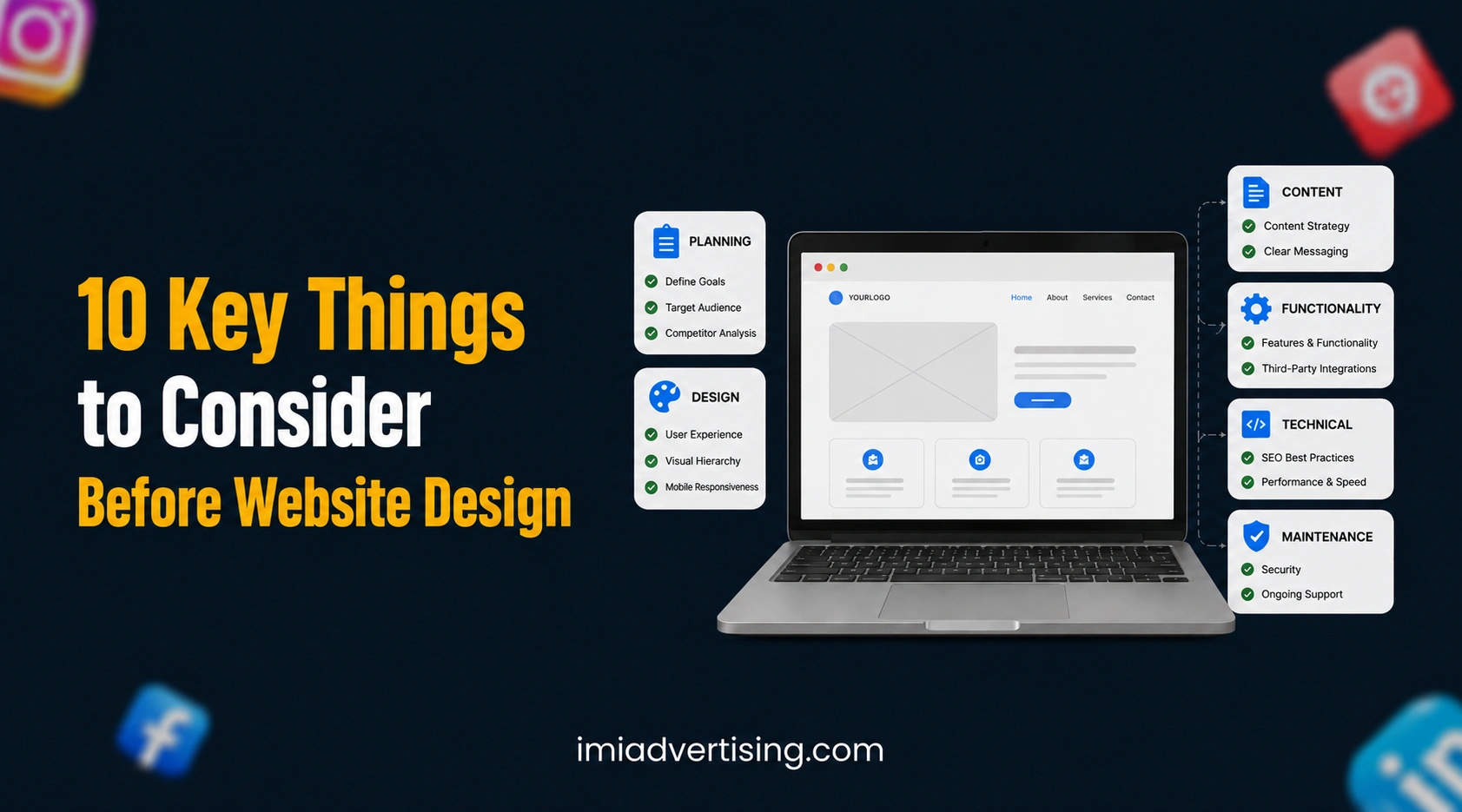
A website should be planned around what customers need to see, understand, and do, not simply how the homepage looks. Before starting from zero, business owners should fix the website goal, page structure, content, branding, mobile experience, SEO, enquiry flow and future marketing requirements. Most customers will visit from their phones, so the website needs to be easy to use on smaller screens from the beginning. Making these decisions early can prevent unnecessary redesigns, missing pages and SEO issues after launch.

What to Plan Before Starting Your Website

At IMI Advertising, website development is planned alongside digital marketing so the website has a clear purpose beyond its visual design. This approach helps businesses build a website that can support visibility, enquiries, and future campaigns from the beginning.

1. Fix the Main Purpose of the Website

First, decide what the website needs to achieve. Is the main goal to generate enquiries, receive calls, book appointments, sell products, or build trust? This decision should come before choosing layouts because it determines what visitors need to see and what action they should take.

A service-based website, for instance, may need strong service pages and enquiry options, while an e-commerce website will need a completely different customer journey. Keep one primary conversion goal for the website and make the important pages support it.

2. Understand Who Will Use the Website

Your website should answer the questions your customers actually have. Before development begins, identify who you want to attract, what they are looking for, and what information they need before contacting your business.

Think about questions related to your services, process, pricing approach, location, experience, and trust. These answers can then guide the page structure, headings, content and CTA placement instead of adding information simply because there is space on the page.

3. Plan the Sitemap Before Designing Pages

Do not start designing individual pages without first deciding how the website will be organised. Prepare the sitemap and decide which pages belong under the main navigation and how users will move between related pages.

Your initial structure may include:

  • Home
  • About
  • Services
  • Individual service pages
  • Portfolio or case studies
  • Blog
  • Contact
  • Location pages, where relevant

Also consider future services and content before finalising the structure. Changing the architecture after development can create unnecessary work and may affect URLs and SEO.

4. Decide the Content Before Final Design

Content should not be an afterthought. If the design is completed first, the final copy may have to fit into sections that were never designed around the actual information customers need.

Prepare the main headings, service information, USPs, trust signals, FAQs and CTAs before approving the final design. This gives the designer enough information to create sections that feel natural instead of filling the website with oversized banners and unnecessary visual elements.

5. Keep Mobile-Friendly Design at the Centre

Mobile usability needs to be considered from the first design stage. Customers should be able to read the content, open the menu, tap buttons, complete forms and find contact information without zooming or struggling with the layout.

Pay attention to font sizes, spacing, image scaling, button placement and form length. A website can look polished on a desktop but still create a poor experience if the mobile version feels crowded or difficult to navigate.

6. Fix Your Logo and Brand Colours Early

Your website should maintain the same visual identity as the rest of your business. Finalise the logo, brand colours, colour codes, fonts and basic design style before the website moves into development.

Providing exact HEX colour codes is useful because it keeps buttons, headings, backgrounds and other design elements consistent across pages. The logo should also be supplied in suitable formats and versions so it remains clear across desktop, mobile and other digital platforms.

This stage should also establish the typography hierarchy, CTA style, icons and overall visual direction. Fixing these details early reduces repeated design changes later.

7. Create a Clear Navigation and User Journey

A visitor should not have to search for basic information. Keep the main navigation focused on the pages that matter most and use familiar labels so users immediately understand where each option will take them.

The page journey also matters. After reading about a service, the visitor should have an obvious next step, whether that means contacting the business, requesting information, viewing related work, or moving to another relevant service page.

8. Plan SEO From Day One

SEO should be part of website planning rather than a task added after development. Each important page should have a clear search purpose, target keyword, URL, and heading structure.

For businesses targeting Ahmedabad, keywords such as website design company in Ahmedabad, digital marketing company in Ahmedabad, marketing agency in Ahmedabad, and advertising agency in Ahmedabad should be mapped to relevant pages naturally. Avoid putting every keyword on every page; each term should have a logical place within the website.

Also decide the internal linking structure, metadata, image alt text and location targeting before launch.

9. Plan Speed, Security and Accessibility

Design choices can affect how quickly a website loads. Large images, unnecessary animations and excessive scripts can make pages heavier, particularly for mobile users.

Before launch, check image optimisation, HTTPS, forms, software updates and basic accessibility. Text should remain readable, important buttons should be usable, and the website should work properly across common devices. These are website requirements, not optional finishing touches.

10. Build It for Future Marketing

Do not build the website only for what the business needs today. If you plan to invest in SEO, Google Ads, social media, content marketing or location-based campaigns later, the website should have enough flexibility to support them.

This is where combining website development with digital marketing can be useful. At IMI Advertising, website development is considered alongside marketing requirements so the website can support ongoing visibility and lead generation without requiring major structural changes whenever a new campaign or service is introduced.

Final Checks Before Launch

Before publishing the website, complete one final review of the entire user experience. Check forms, CTAs, mobile layouts, URLs, redirects, internal links, metadata, images, contact details, and analytics tracking.

Also verify that the logo, colour codes, fonts and other brand elements remain consistent across the website. A final review at this stage can catch small issues before they affect real visitors.

Conclusion

Good website design starts well before the first page is developed. Business owners should decide the purpose, audience, sitemap, content, branding, mobile experience, SEO structure, and future marketing requirements before approving the final design.

The objective is simple: create a website that is easy for customers to understand, easy for them to use, and ready to support the business as it grows.

FAQs:

Yes. The business should ideally control the domain registration and renewal rather than depending entirely on an outside agency or developer.

Yes. A redesign can usually keep the same domain, but URLs and page structures should be handled carefully so existing search visibility and useful backlinks are not unnecessarily lost.

Provide the original high-quality logo files whenever possible, preferably in editable or vector formats, along with approved variations for light and dark backgrounds if available.

Exact colour codes help maintain consistency across buttons, backgrounds, headings, and other elements. Without fixed codes, the same brand colour can appear slightly different across different pages.

Ideally, yes. Setting up analytics and search monitoring before launch gives the business a clean starting point for measuring traffic, user behaviour and website performance.

Get in touch with us for

Digital Marketing Services

09313100658

Available From 09:30 – 06:30

Email: support@imiadvertising.com
AI writing tools for content writers

7 Best AI Writing Tools Every Content Writer Should Try

7 Best AI Writing Tools Every Content Writer Should Try

AI writing tools can help with much more than generating a blog. Depending on the platform, they can support research, content ideas, editing, SEO optimisation, marketing copy and creative writing.

But every tool works differently. This guide compares 7 AI writing tools for content writers based on their features, pricing, best use cases and specific limitations.

7 Best AI Content Writing Tools to Create Better Content

At IMI Advertising, we use AI tools as part of our content workflow for research, ideation, drafting, editing and optimisation. Based on their different features and use cases, here are seven AI writing tools worth exploring for content creation.

1. ChatGPT – Best Overall AI Writing Tool

ChatGPT is a versatile AI writing assistant that can support almost every stage of content creation. It can help with topic ideas, outlines, drafts, rewrites, summaries, research and file analysis, making it useful for writers handling different types of projects.

Paid/Free: ChatGPT has a free plan, while ChatGPT Plus costs $20/month.

Its key strengths include content ideation, blog drafting, rewriting, summarisation, file analysis, web research and custom workflows. It is best for bloggers, SEO writers, freelancers and marketing teams. Its limitation is that it is not a dedicated SEO platform, so advanced SEO analysis may require additional tools.

2. Grammarly – Best for Editing and Proofreading

Grammarly focuses mainly on improving existing content. It checks grammar, spelling, clarity and tone while also offering AI-powered rewriting, making it useful when you already have a draft and want to make it cleaner and easier to read.

Paid/Free: Grammarly offers a free plan, while Grammarly Pro costs $12/month when billed annually or $30/month when billed monthly.

Its main features include grammar correction, rewriting, tone detection, clarity suggestions and AI text generation. It is best for writers and editors who want polished copy. Its limitation is that it does not provide complete keyword research or an SEO content strategy.

3. Jasper – Best for Marketing and Brand Content

Jasper is built around marketing and brand content. Its Brand Voice and Brand Knowledge features allow businesses to provide information about their brand, audience and communication style, helping maintain consistency across marketing content.

Paid/Free: Jasper offers a 7-day free trial. Its Pro plan costs $69/month or $59/month when billed annually, while business pricing is customised.

Key features include brand voice, brand knowledge, marketing content creation, content repurposing and marketing workflows. It is best for agencies, marketing teams and established brands. Its main limitation is its higher cost for individual writers with occasional content needs.

4. Writesonic – Best for SEO and AI Search Content

Writesonic combines AI content creation with SEO and search visibility. Along with its AI Article Writer, it offers content optimisation, site audits and tools for tracking brand visibility across AI search platforms.

Paid/Free: Writesonic offers a free trial, while its Starter plan costs $79/month when billed annually or $99/month monthly.

Features include AI article creation, SEO optimisation, content strategy, site audits and AI search visibility tracking across platforms such as ChatGPT, Gemini and Google AI Overviews. It is best for SEO writers, agencies and publishers. Its limitation is the price if you only need basic AI writing assistance.

5. Copy.ai – Best for Marketing Copy and Workflows

Copy.ai focuses on marketing and go-to-market content rather than traditional blogging alone. It can create different types of marketing copy and provides access to multiple AI models, making it useful for campaigns that need content in several formats.

Paid/Free: Its Chat plan starts at $29/month or $24/month when billed annually.

Key features include marketing copy, email content, social media copy, content repurposing, AI chat, multiple AI models and workflow automation. It is best for marketing writers, agencies and sales teams. Its limitation is that its workflow-focused features may be unnecessary for writers who mainly produce standard SEO blogs.

6. Rytr – Best Budget-Friendly AI Writing Tool

Rytr is a simple AI writing platform for everyday content tasks. It can help create short blog sections, emails, social media captions, calls to action and other smaller pieces of copy without the complexity of a larger content platform.

Paid/Free: Rytr has a free plan with 10,000 characters per month, while its Unlimited plan starts at $7.50/month when billed annually.

Features include AI content generation, different writing tones, tone matching, SEO meta titles, plagiarism checking on paid plans and a Chrome extension. It is best for beginners, freelancers and small businesses. Its limitation is that it is better suited to shorter tasks than research-heavy long-form content.

7. Sudowrite – Best for Creative Writing

Sudowrite is designed specifically for creative writers rather than general business or SEO content. It helps writers develop scenes, brainstorm ideas, expand descriptions and continue stories when they get stuck.

Paid/Free: Sudowrite offers a free trial, while its Hobby & Student plan starts at $10/month when billed annually.

Its features include brainstorming, story development, scene expansion, creative rewriting and long-form fiction assistance. It is best for novelists, fiction writers and screenwriters. Its limitation is its storytelling focus, which makes it less useful for SEO blogs, website copy and business content.

What to Do After Writing Content With AI Tools?

AI-generated content should not be published without a final review. These five checks can help improve accuracy, originality and readability.

1. Check the AI Tone: Read the content once without editing. Remove repetitive patterns, unnecessary phrases and wording that feels too generic or robotic.

2. Check for Plagiarism: Run the final draft through a reliable plagiarism checker to identify wording that may be too similar to existing content.

3. Check Every Heading Against Its Content: Make sure every section actually delivers what its heading promises. A heading about SEO, for example, should contain useful SEO information, not just general writing advice.

4. Verify Facts, Numbers and Claims: Check pricing, statistics, features, dates and other changing information against reliable or official sources before publishing.

5. Give the Final Content a Human Edit: Read the complete article like a reader. Remove repetition, shorten long sentences, improve transitions and add useful details where needed.

Need Help With Content and Digital Marketing?

AI tools can speed up content creation, but a strong digital strategy needs the right research, SEO, content planning and execution. IMI Advertising helps businesses build stronger online visibility through SEO, content marketing, digital marketing and performance-focused strategies.


Conclusion

The seven AI writing tools covered here serve different purposes. ChatGPT works well for general content tasks, Grammarly focuses on editing, Jasper on brand content, and Writesonic on SEO and AI search visibility. Copy.ai, Rytr and Sudowrite are more specialised for marketing workflows, affordable content creation and creative writing.

The best choice depends on the type of content you create and the part of your workflow where you need the most help. AI can speed up writing, but the final content should always be reviewed and edited by a human.

FAQs:

Yes. Some tools offer SEO-focused features, but keyword targeting, search intent and content quality still need human review.

No. They can speed up research, drafting and editing, but human writers are still needed for expertise, originality, context and final judgement.

Sudowrite is the most specialised option on this list for fiction, storytelling and other creative writing tasks.

Yes. Several tools can generate captions, promotional copy, post ideas and other short-form social media content.

Yes. Many AI writing platforms support multiple languages, but the number of supported languages and the quality of output can vary between tools.

Get in touch with us for

Digital Marketing Services

09313100658

Available From 09:30 – 06:30

Email: support@imiadvertising.com
Google Ads Agencies in Ahmedabad

Top 8 Google Ads Agencies in Ahmedabad 2026

Top 8 Award-Winning Google Ads Agencies in Ahmedabad

Google Ads Agencies in Ahmedabad

Businesses in Ahmedabad use Google Ads to reach customers who are actively searching for their products and services. Choosing the right agency can make a significant difference in campaign performance, from keyword targeting and ad optimisation to conversion tracking and budget management.

We’ve compared 8 Google Ads agencies in Ahmedabad based on their Google Ads services, experience, Google Partner credentials, campaign expertise, awards, and publicly available information. Here’s what each agency offers and what businesses should consider before choosing a PPC partner.

Top Google Ads Agencies in Ahmedabad

How we selected these agencies: This list considers publicly available information such as Google Ads and PPC services, Google Partner credentials, experience, awards, campaign capabilities, and company information available at the time of writing. The order does not represent an official Google ranking.

1. IMI Advertising

IMI Advertising is an Ahmedabad-based digital marketing agency offering Google Ads and PPC management along with SEO, social media marketing, and performance marketing. Its PPC services cover campaign planning, optimisation, conversion tracking, and performance reporting. The agency also currently displays Google Partner credentials on its website.

Its Google Ads services can be relevant for businesses focused on lead generation and measurable campaign performance, particularly when enquiries, calls, conversions, and advertising ROI need to be tracked regularly.

2. Brand Height

Brand Height is an Ahmedabad-based digital marketing agency offering online advertising and digital marketing solutions for businesses. It is included in this comparison for businesses exploring local agencies for paid marketing and broader digital growth services.

Before choosing Brand Height for Google Ads management, businesses should review its current PPC services, campaign experience, reporting process, and Google Partner credentials to ensure they match their advertising goals and industry requirements.

3. Digital Big Bull

Digital Big Bull is an Ahmedabad-based advertising agency with expertise that includes Google Ads, performance marketing, and lead generation. Its current company information states that it has 8+ years of experience and works with startups, SMEs, and growing brands using data-driven marketing strategies.

Its Google Ads work sits within a broader performance marketing approach, which can be useful for businesses that want paid search connected with lead generation, social advertising, and SEO. The company is headquartered in Ahmedabad and specifically lists Google Ads among its core specialties.

4. URTEQi

URTEQi provides Google Ads and PPC management in Ahmedabad, with services covering search campaigns, display advertising, remarketing, and Google Shopping. Its Google Ads specialists focus on keyword research, campaign structure, tracking, ad copy, bidding, and testing.

URTEQi also states that it is a Google Partner agency and has an Ahmedabad headquarters at Shivalik Shilp near Iscon Cross Road. Its approach can suit businesses that need more technical PPC management, especially eCommerce companies using Google Shopping alongside search advertising.

5. Clients Now

Clients Now is an Ahmedabad-based digital marketing agency offering Google Ads and PPC management. According to its website, the agency has 10+ years of experience and has served 500+ brands, with services covering Search, Display, Shopping, YouTube, and Performance Max campaigns.

The agency highlights its Certified Google Partner status and recognitions, including the MY FM Build Gujarat 2025 Best SEO & Google Ads Agency Award. Its PPC services focus on campaign management, conversion tracking, optimisation, and performance analysis.

6. Service Ninjas

Service Ninjas is an Ahmedabad-based agency focused on Google Ads and PPC management. It states that it has been a Certified Google Ads Partner since 2020 and has a team of 20+ Google Ads specialists handling campaign setup, optimisation, tracking, and management.

According to its current website, Google Ads management starts at ₹10,000 per month for ad spend up to ₹1 lakh in Ahmedabad. The agency also reports a 4.9 rating from 382 reviews on its Google Ads service page.

7. WebIndia Inc.

WebIndia Inc. has a strong Google Ads profile, including Google Premier Partner status. Its current Google Ads page states that it has 60+ in-house Google-certified experts, 16+ years of experience, and a 92% client retention rate.

The agency manages Google Ads campaigns for local and international markets and highlights performance-focused campaigns involving lead generation, conversions, and revenue.

8. Go Ads India

Go Ads India is an Ahmedabad-based digital marketing company with a strong focus on search and performance marketing. Its current information reports 17+ years of experience, 3,500+ clients, and 500+ Google Ads campaigns managed across India.

Its Google Ads service is connected with SEO and conversion optimisation, allowing businesses to manage search visibility, paid traffic, and website conversions through one strategy. Go Ads India also lists Google Partner status and reports experience across industries such as healthcare, real estate, education, aviation, and manufacturing.

Conclusion

Ahmedabad has several agencies offering Google Ads, PPC management, Search, Shopping, Display, YouTube, and Performance Max campaigns. The 8 agencies covered in this list are IMI Advertising, Brand Height, Digital Big Bull, URTEQi, Clients Now, Service Ninjas, WebIndia Inc., and Go Ads India, with different Google Ads services, expertise, credentials, and campaign capabilities.

For businesses looking for a Google Ads Agency in Ahmedabad, compare the agencies based on the campaign type, target market, advertising budget, and PPC services required.

FAQs:

The list includes IMI Advertising, Brand Height, Digital Big Bull, URTEQi, Clients Now, Service Ninjas, WebIndia Inc., and Go Ads India. Their Google Ads services and campaign capabilities vary.

A PPC Management Company in Ahmedabad manages paid campaigns across areas such as keyword targeting, ad creation, bidding, conversion tracking, search-term analysis, and campaign optimisation.

Google Ads management fees vary by agency, campaign size, and service scope.

IMI Advertising, URTEQi, Clients Now, Service Ninjas, WebIndia Inc., and Go Ads India publicly highlight Google Partner or related Google Ads credentials on their current websites.

Google Ads is Google's advertising platform, while PPC refers to the pay-per-click advertising model. Google Ads includes several PPC campaign formats, including Search, Shopping, Display, and other campaign types.

Compare agencies based on their experience with your industry, Google Ads campaign types, conversion tracking setup, reporting process, communication, management fees, and previous results.

Get in touch with us for

Digital Marketing Services

09313100658

Available From 09:30 – 06:30

Email: support@imiadvertising.com
Facebook Retargeting

Facebook Retargeting: How to Bring Back People Who Didn’t Buy

Facebook Retargeting: How to Bring Back People Who Didn’t Buy

Facebook Retargeting

Someone sees your Facebook ad, clicks on it, visits your product or service page, and then leaves without buying or submitting an enquiry. That person may still be interested; they may simply need more information, trust, or another reason to take action.

Facebook Retargeting allows you to reach these users again based on what they previously did. Instead of showing the same advertisement to everyone, you can create specific audiences and show each group a more relevant follow-up ad.

What Is Facebook Retargeting?

Facebook Retargeting is the process of showing Facebook or Instagram ads to people who have already interacted with your business but haven’t completed the desired action.

They may have viewed a product, visited a website page, watched a video, interacted with your Instagram content, added an item to their cart, or opened a lead form without submitting it. These actions can be used to create audiences for follow-up advertising.

The key is to retarget users according to what they did, rather than showing every person the same ad.

What You Need Before Starting Facebook Retargeting

Before starting, you need Meta Ads Manager, the Meta Pixel for website activity, relevant events, and a clear conversion goal. Depending on your setup, Conversions API (CAPI) can also support event sharing.

First, decide what you want to recover: purchases, abandoned carts, leads, enquiries, or another conversion. This makes it easier to create the right Custom Audience and retargeting campaign.

How Facebook Retargeting Works

Step 1: Set Up Meta Tracking

For website campaigns, the Meta Pixel can help track important actions such as page views, product views, add-to-cart actions, lead submissions, and purchases. Conversions API can also support event sharing through a server-side setup.

This tracking helps you identify what users did before deciding what they should see next.

Step 2: Build a Custom Audience

Create a custom audience based on the user action you want to retarget. You can create audiences for website visitors, product viewers, cart abandoners, video viewers, Facebook and Instagram engagers, or lead-form users.

Keep audiences specific instead of putting every user into one large group.

Step 3: Segment the Audience by Intent

Different actions show different levels of interest, so your retargeting message should match the user’s intent.

Audience Retargeting Message
Product Viewers Benefits, reviews or product reminder
Add-to-Cart Users Reminder, offer or purchase incentive
Video Viewers Product explanation or proof
Social Engagers Product information or testimonial
Lead-Form Users FAQs or trust signals
Previous Customers Cross-sell or repeat purchase

Facebook Retargeting Activities You Can Run

Retargeting can use different Facebook, Instagram, and website interactions to create warm audiences.

1. Website and Product Retargeting

If someone visits your website or views a specific product or service page without converting, show them a follow-up ad focused on benefits, reviews, FAQs, or a reminder.

2. Add-to-Cart Retargeting

Target people who added a product to their cart but didn’t purchase. Instead of repeating the original ad, highlight product benefits, reviews, delivery information, or a relevant offer.

3. Video View Retargeting

People who watch a meaningful portion of your video can receive a second ad focused on product benefits, testimonials, proof, or an offer.

Video ad: Explain the product or problem.
Retargeting ad: Give the user a reason to take the next step.

4. Facebook and Instagram Engagement Retargeting

People who interact with your Facebook or Instagram content can be retargeted with product information, testimonials, benefits, or conversion-focused content.

5. Lead Form Retargeting

If someone opens or interacts with a lead form without submitting it, use a follow-up ad to answer common questions, build trust, or give them a stronger reason to complete the enquiry.

How to Create a Facebook Retargeting Campaign

Once your Custom Audience is ready, create a Facebook Ads campaign based on the action you want the user to complete.

For purchases, choose a sales objective and target a relevant audience such as product viewers or cart abandoners. For enquiries, use a lead-focused campaign and select the appropriate Custom Audience.

At the ad-set level, select your audience and make sure the campaign is targeting the correct users. Then create an ad that continues the user’s previous experience.

Example:

First ad: Discover our new ergonomic office chairs.
User action: Visits the product page but doesn’t purchase.
Retargeting ad: Still looking for a comfortable office chair? See the features customers consider before choosing.

The second ad works because it follows the user’s previous action instead of repeating the original introduction.

What Type of Retargeting Ads Should You Use?

Choose your creative according to the user’s previous action.

Reminder ads bring the product back to attention. Testimonial ads build trust. Benefit-focused ads explain why the product or service is worth choosing. FAQ ads address doubts, while offer ads can provide an additional reason to convert.

The main rule is simple: match the creative with the user’s intent instead of showing one generic sales ad to everyone.

Facebook Ads vs Facebook Retargeting

Facebook Ads and Facebook Retargeting are connected, but they are not exactly the same.

Regular Facebook Ads Facebook Retargeting
Can target new or broader audiences Targets people who already interacted
Often focuses on awareness or initial interest Focuses on bringing interested users back
Introduces the product or service Continues the previous conversation
Can target cold audiences Uses warm Custom Audiences

Exclude People Who Already Converted

Retargeting isn’t only about deciding who should see your ads. You also need to decide who should stop seeing them.

If someone has already completed the desired action, exclude them from the relevant conversion-focused retargeting campaign.

For example:

Retargeting audience: Add-to-cart users
Exclusion: Purchasers

For a lead campaign:

Retargeting audience: Lead-form users
Exclusion: Completed leads

This prevents your budget from continuing to target people who have already completed the action you are trying to generate.

Best Practices for Facebook Retargeting

Segment Users by intent: Keep product viewers, cart abandoners, video viewers, social engagers, and lead users in relevant audiences. Their previous action should determine the next message.

Control Ad Frequency: Monitor how often people see your ads. If frequency increases while engagement or conversions decline, refresh the creative or review the audience.

Refresh Your Creative: Retargeting audiences can be small, so users may see the same ad repeatedly. Test different hooks, images, videos, testimonials, benefits, and calls to action.

Use the Right Audience Window: Someone who visited your website recently may have stronger intent than someone who visited weeks ago. Choose the audience window according to your buying cycle and test what performs best.

How to Measure Facebook Retargeting Performance

Clicks alone don’t tell you whether your retargeting campaign is working.

Metric What It Tells You
CTR Whether the ad attracts attention
CPC Cost of generating a click
Frequency How often users see the ad
Conversion Rate How effectively users take action
Cost Per Lead Cost of generating an enquiry
Cost Per Purchase Cost of generating a sale
ROAS Revenue generated against ad spend

For sales campaigns, focus on purchases, revenue, cost per purchase, and ROAS. For lead campaigns, monitor lead quality, cost per lead, and qualified leads rather than clicks alone.

Common Facebook Retargeting Mistakes

Common mistakes include using one audience for everyone, showing the same creative repeatedly, forgetting to exclude converted users, ignoring ad frequency, and optimizing for clicks instead of conversions.

Don’t assume every retargeted user needs a discount. The real barrier may be a lack of trust, missing information, uncertainty about the product, or simply the need for a reminder.

Retargeting brings the person back; your message and creative still need to give them a reason to convert.

Need Help With Facebook Retargeting?

Setting up Facebook Retargeting correctly involves more than simply showing ads to previous visitors. Audience segmentation, tracking, campaign objectives, creative, exclusions, frequency, and conversion tracking all need to work together.

If you want to run Facebook Ads with a structured retargeting strategy, IMI Advertising can help plan and manage campaigns based on user behaviour and business goals. From audience targeting and ad creatives to campaign optimization, the focus is on reaching the right users with the right message.

Explore Facebook Marketing Services to learn more about Facebook advertising and retargeting support.

Conclusion

Facebook retargeting helps you bring interested users back by showing them a message based on their previous interaction. 

The process starts with tracking user activity, creating custom audiences, segmenting users by intent, showing the right creative, excluding converted users, and measuring conversions.

The most important rule is simple:

What the user did before should influence what they see next.

When your retargeting campaign follows that principle, your ads become more relevant and easier to optimize.

FAQs:

Facebook Retargeting shows Facebook or Instagram ads to people who have already interacted with your business but haven't completed the desired action.

You generally need Meta Ads Manager, Meta Pixel, relevant events, a Custom Audience, and a clear conversion goal. Conversions API can also be used where appropriate.

Common audiences include website visitors, product viewers, add-to-cart users, video viewers, Facebook and Instagram engagers, and lead-form users.

No. A cart abandoner, product viewer, and video viewer have different levels of intent, so their retargeting messages should reflect their previous actions.

Refresh creatives every 2-3 weeks to avoid ad fatigue, since the same small audience seeing repetitive ads leads to declining click-through rates. 

Get in touch with us for

Digital Marketing Services

09313100658

Available From 09:30 – 06:30

Email: support@imiadvertising.com
Social Media Marketing Company

What Services Does a Social Media Marketing Company Provide?

What Services Does a Social Media Marketing Company Provide?

Social Media Marketing Company

A social media marketing company helps businesses build and manage their presence on platforms such as Instagram, Facebook, LinkedIn and YouTube. Its work goes beyond publishing regular posts; it includes content planning, creative production, audience engagement, paid campaigns, and performance tracking.

The goal is to use social media to improve brand visibility, engagement, enquiries and leads through the right platforms, content and campaigns.

What Does an SMM Company Actually Handle?

A good social media team manages the complete process, from deciding what to post and where to post it to tracking how people respond. Depending on the business and package, this can include:

  • Strategy: Audience, competitors, content direction and platform selection
  • Content: Posts, carousels, captions, Stories and Reels
  • Management: Scheduling, publishing, comments and DMs
  • Advertising: Paid campaigns, audience targeting and optimisation
  • Reporting: Reach, engagement, traffic, leads and campaign performance

The focus should be on connecting social media activities with business goals rather than simply increasing the number of posts.

Which Social Media Platforms Should a Business Use?

You don’t need to manage every social platform. A best Social Media Marketing Agency in Ahmedabad should first identify where your potential customers are and then choose the platforms that make sense for your business.

Platform What an Agency Can Manage
Instagram Posts, carousels, Reels, Stories, captions, engagement and ads
Facebook Posts, Reels, offers, community management, lead ads and campaigns
LinkedIn Company updates, industry content, case studies and B2B lead generation
YouTube Shorts, educational videos, product/service videos and video optimisation

The right mix depends on the business. A visual B2C brand may prioritise Instagram, a B2B company may focus on LinkedIn, while a local business may use Instagram and Facebook to build visibility and generate enquiries.

The important thing is not being everywhere; it is being active on the platforms that can actually reach your customers.

What Social Media Activities Should You Get?

When you hire a social media marketing company, the monthly work should cover more than publishing posts.

Content Planning & Creation: The agency should prepare a content calendar and create relevant posts, carousels, Reels, Stories, captions, and campaign creatives based on your business and audience.

Community Management: Comments, mentions and relevant messages should be monitored and handled so customers are not left waiting for a response.

Paid Advertising: If ads are included, the agency should manage campaign setup, audience targeting, creatives, budgets, testing and optimisation.

Analytics & Reporting: Reports should show useful metrics such as reach, engagement, video views, profile activity, website traffic, leads and advertising performance where applicable.

The goal is simple: create the right content, reach the right people and learn from the results.

What Results Can Social Media Marketing Deliver?

Social media marketing can support different business goals depending on the strategy, industry and campaign type. Common outcomes include brand awareness, audience engagement, website traffic, enquiries, leads and product or service discovery.

Organic content can help build visibility and trust, while paid campaigns can reach specific audiences for traffic or lead generation. The metrics should match the goal – reach and engagement for awareness, traffic for website visits, and enquiries or leads for lead-generation campaigns.

That is why social media should not be judged only by followers or likes. The better question is whether the activity is helping the business move closer to its actual marketing goal.

What Should You Check Before Hiring an SMM Agency?

Before hiring a Digital Marketing Service in Ahmedabad, don’t compare agencies only by monthly price or number of posts.

Check these five things:

  1. Platforms: Which platforms will they manage and why?

  2. Content: How many posts, Reels, Stories and creatives are included?

  3. Management: Who handles posting, comments and messages?

  4. Ads: Is paid advertising included separately or in the package?

  5. Reporting: Which metrics and recommendations will you receive every month?

A clear scope helps you understand exactly what you are paying for and makes it easier to compare agencies based on actual work. 

How IMI Advertising Handles Social Media Marketing

IMI Advertising provides social media marketing services covering strategy, content creation, social media management, engagement, paid advertising, analytics and reporting.

Its wider digital marketing services also include SEO, Google Ads, content marketing and lead generation, allowing businesses to connect social media with other digital marketing activities when needed.

Explore IMI Advertising’s Social Media Marketing Services

Conclusion

A social media marketing company should give your business more than regular posts. The right agency combines strategy, platform-specific content, audience engagement, advertising, and reporting to support real business goals.

If you’re comparing a Social Media Marketing Company in Ahmedabad, look at the actual work, process, and measurable outcomes, not just the number of posts or followers promised.

FAQs:

It manages a business's social presence through strategy, content creation, posting, engagement, paid campaigns and performance tracking.

Depending on the business, an agency may manage Instagram, Facebook, LinkedIn, YouTube and other relevant platforms.

Yes, Reels can be part of the content strategy, especially for businesses that can communicate effectively through short-form video.

Many agencies do. Confirm whether campaign setup, targeting, budget management, optimisation and reporting are included in your package.

Check its strategy, content quality, platform expertise, management process, reporting and advertising capabilities, not just its number of posts or followers.

Get in touch with us for

Digital Marketing Services

09313100658

Available From 09:30 – 06:30

Email: support@imiadvertising.com
Digital Marketing ROI

How to Measure the ROI of Digital Marketing Service

How to Measure the ROI of Digital Marketing Service

Digital Marketing ROI

Digital marketing ROI measures how much business value a company generates from its digital marketing investment. It can be measured through revenue, qualified leads, customer acquisition cost, conversion value, and profit – not just clicks, traffic, or followers.

For businesses working with IMI Advertising, ROI can be measured across SEO, social media, Google PPC, and website performance by connecting marketing activity with leads, sales, customer value, and overall business growth.

What Is Digital Marketing ROI?

Digital marketing ROI measures the financial return generated from your digital marketing investment.

A simple formula is:

ROI = (Revenue Generated − Marketing Cost) ÷ Marketing Cost × 100

For example, if a business spends ₹1,00,000 on digital marketing and generates ₹3,00,000 in attributable revenue, the calculation is:

(₹3,00,000 − ₹1,00,000) ÷ ₹1,00,000 × 100 = 200% ROI

However, not every business receives an immediate online sale. For service businesses, the journey may be Google search → website → enquiry → sales call → qualified lead → customer. Therefore, lead quality and customer value also need to be included in ROI measurement.

Google also recommends measuring conversions and assigning values to them because conversion value provides a better view of the actual business impact of advertising than simply counting conversions.

Why ROI Measurement Matters More Than Vanity Metrics

Likes, followers, and website traffic can show activity, but they do not necessarily show business growth. Businesses that track ROI properly can:

  • Identify which channels are generating valuable leads and sales
  • Identify underperforming campaigns and make better budget decisions
  • Justify marketing investment with measurable business results
  • Scale channels that consistently generate value

A campaign with 10,000 impressions and zero conversions may create less business value than a campaign with 500 impressions and 20 paying customers. Looking at conversions, customer value, and revenue helps identify which campaign is actually contributing to business growth.

Key Metrics to Track by Channel

Different channels need different measurement approaches. Here’s a practical breakdown:

Channel Primary Metric Supporting Metrics
SEO Organic revenue vs. SEO spend Keyword rankings, organic traffic, conversion rate
Social Media Marketing Cost per lead/sale from social Engagement rate, reach, follower-to-customer ratio
Facebook Marketing Cost per result (CPR), ROAS CTR, cost per lead, ad relevance score
PPC / Google Ads ROAS (Return on Ad Spend) Cost per click, conversion rate, Quality Score
Website Design Conversion rate, bounce rate Page load speed, time on site, form submissions

ROAS formula (used heavily in PPC and Facebook Ads):

ROAS = Revenue from Ads / Ad Spend

A ROAS of 4:1 means every ₹1 spent on advertising generated ₹4 in attributed revenue. Whether that is profitable depends on the business’s margins, operating costs, customer value, and sales model. 

A Practical Way to Measure Digital Marketing ROI

Use this five-step process every month:

Step 1: Set a business goal

Decide whether the priority is sales, qualified leads, brand awareness, website enquiries, app downloads, or another measurable outcome.

Step 2: Assign value to conversions

A ₹1,00,000 service enquiry should not necessarily have the same value as a low-value enquiry. Assigning realistic values makes reporting more useful.

Step 3: Track every major channel

Connect SEO, Google Ads, social media and website activity with analytics and conversion tracking.

Step 4: Compare cost with business results

Do not stop at clicks or traffic. Compare marketing investment with qualified leads, customers, revenue and profit.

Step 5: Reallocate the budget

Put more budget behind channels that consistently produce valuable outcomes and improve or reduce investment in weak campaigns.

Google Analytics provides tools for comparing marketing performance across channels and supporting better budget allocation decisions.

Channel-Wise Insight: What Actually Moves the Needle

Social media ROI depends on the platform-goal match. A social media marketing company driving brand awareness on Instagram should be measured differently than one running lead-generation campaigns on LinkedIn. Mixing the two metrics gives a false picture.

SEO ROI takes time but compounds. SEO results usually take longer to develop than PPC results. The timeline depends on competition, website authority, technical condition, content quality, search intent, and the starting position of the website.

Facebook marketing ROI is fastest to test and slowest to scale cheaply. A Facebook marketing company can show results within days, but the cost per result often rises as you scale – track ROAS weekly, not monthly, to catch this early.

PPC ROI is usually the most immediate to measure. A PPC management company should monitor ROAS, cost per conversion, conversion rate, and lead quality regularly. Paid traffic generally stops when advertising spend stops, while SEO can continue generating organic traffic after rankings are established.

Website design directly changes conversion rate. A website design company that improves your site’s speed and mobile usability can improve conversion performance without increasing advertising spend, provided the changes address genuine usability or conversion problems.

What a Good Digital Marketing Report Should Show

A useful monthly report should answer three simple questions:

What did we do?

SEO improvements, content, social campaigns, PPC campaigns, landing pages and website changes.

What happened?

Rankings, traffic, reach, engagement, clicks, leads, conversions and sales.

What should happen next?

Which campaigns should receive more budget, which keywords need improvement, which ads should be changed, and which website pages need optimization.

This makes the report a decision-making document rather than a collection of screenshots.

How IMI Advertising Looks at Digital Marketing ROI

At IMI Advertising, we align SEO, social media marketing, PPC, and website design with the business goal – not just individual metrics. SEO builds organic visibility, social media drives engagement and enquiries, PPC captures high-intent users, and website design converts that traffic into leads.

The goal is simple: connect every digital marketing activity with measurable business outcomes such as qualified leads, conversions, customers, and revenue. This helps businesses understand which digital channels are actually moving them forward.

Final Takeaway

The ROI of digital marketing is not about choosing between SEO, social media, PPC, or website design. It is about understanding how each digital activity helps move a potential customer closer to becoming a real customer.

A strong digital marketing service should therefore report more than rankings, followers, clicks, and impressions. It should show the connection between marketing investment and business outcomes.

That is the difference between being digitally active and actually moving digitally ahead.

FAQs:

Digital marketing ROI measures the business value generated by digital marketing relative to the amount invested. It can be calculated using revenue, profit, leads, customer acquisition cost, or another clearly defined business outcome.

Digital marketing ROI can be calculated using the formula ROI = (Revenue Generated − Marketing Cost) ÷ Marketing Cost × 100. For lead-generation businesses, qualified lead value and customer acquisition cost can also be used to evaluate performance.

There is no single channel that gives the best ROI for every business. SEO can build long-term organic growth, PPC can capture immediate search demand, social media can build awareness and engagement, and website optimisation can improve conversions.

PPC can generate measurable results quickly, while SEO usually requires more time to build sustainable organic visibility. The right measurement period depends on the business model, competition, sales cycle, and marketing channel.

A “good” ROAS depends on margins, average order value, customer lifetime value, and operating costs. A 5X ROAS may be excellent for one business but unprofitable for another.

Get in touch with us for

Digital Marketing Services

09313100658

Available From 09:30 – 06:30

Email: support@imiadvertising.com
Digital Marketing Company Ahmedabad

What Makes IMI Advertising Different in Ahmedabad

What Makes IMI Advertising Different in Ahmedabad

Digital Marketing Company Ahmedabad

Choosing a Digital Marketing Company in Ahmedabad is easier than ever, but choosing the right one is a different story. Almost every agency promises better rankings, more leads, and faster business growth. The real difference lies in how those promises are delivered.

At IMI Advertising, we believe digital marketing should create measurable business results, not just attractive reports. Every strategy is built around your goals, target audience, and industry instead of using a fixed package for every client. That’s why businesses across Ahmedabad trust us for long-term digital growth.

The Digital Marketing Industry Has Changed

Today’s customers don’t make instant buying decisions. They search on Google, compare businesses, read reviews, visit websites, and explore social media before contacting a company. If your business isn’t visible throughout this journey, you’re likely losing potential customers to your competitors.

This shift has made digital marketing more competitive than ever. Simply running ads or publishing social media posts isn’t enough anymore. Businesses need a strategy that connects every marketing channel and delivers a consistent experience to potential customers.

That is exactly where IMI Advertising stands apart. Instead of treating SEO, social media, PPC, and web design as separate services, we combine them into one growth-focused strategy that helps businesses generate quality leads and build a stronger online presence.

About IMI Advertising

IMI Advertising is a full-service Digital Marketing Company in Ahmedabad that helps businesses grow through smart, data-driven marketing. Our team combines creativity with technical expertise to build campaigns that improve visibility, generate leads, and increase conversions.

We work with startups, local businesses, manufacturers, healthcare brands, educational institutions, real estate companies, and many other industries. Since every business has different goals, we create customized strategies instead of relying on standard marketing packages.

What Makes IMI Advertising Different?

Many agencies offer similar services, but the way those services are planned and executed makes all the difference. At IMI Advertising, we don’t chase vanity metrics like “likes or impressions”. We focus on business outcomes that matter, including qualified leads, website enquiries, conversions, and return on investment.

Every campaign starts with understanding your business, competitors, and customers. This helps us create a marketing strategy that supports your long-term goals rather than delivering short-term results that fade over time.

We also believe in complete transparency. You’ll always know what work is being done, why it’s being done, and how it’s contributing to your business growth.

We Build Strategies, Not Standard Packages

No two businesses are the same, so their marketing strategy shouldn’t be either. A local restaurant, an interior designer, and a manufacturing company all have different audiences and buying journeys. Using the same marketing approach for every business rarely delivers the best results.

Our team studies your market, identifies opportunities, and creates a strategy that matches your objectives and budget. Whether your goal is generating more local enquiries, increasing online sales, or building brand awareness, every activity is planned with a clear purpose.

This personalized approach helps businesses achieve consistent growth instead of relying on temporary marketing wins.

One Team Handles Everything

A lot of agencies are really just coordinators: your SEO goes to one freelancer, your ads to another, your website to a third party you’ll never actually speak with. Our SEO, social media, PPC, content, and web design teams work in the same office, which means a technical fix a strategist needs doesn’t sit in someone else’s queue for a week.

That connection matters more than it sounds. When your paid ads and your organic content are planned by the same team, your messaging stays consistent across every touchpoint instead of contradicting itself.

We’re Honest About Fit

Not every business is the right fit for our agency, and we’re comfortable saying that.

If your expectations, budget, or timeline aren’t realistic, we’ll tell you upfront instead of promising results we can’t deliver. We’d rather build long-term relationships with businesses that value strategy and transparency than take on every enquiry that comes through our website.

How a Project with Us Actually Works

  1. Research the market – understand where your audience actually spends time and what makes them decide.
  2. Study the competition – see what’s already working, and what’s clearly not, before spending your budget.
  3. Build a strategy around your goals – not a generic checklist applied to every client.
  4. Optimize for quality over volume – leads and conversions matter more than raw traffic.
  5. Report honestly – if something isn’t working, you’ll hear it directly from us.

The Work Behind the Claims

Talk is easy in this industry, so it’s worth showing where this process has actually played out. One client came to us with keywords that had been stuck for months under a previous agency; we rebuilt the technical foundation of the site first and only after that went after the competitive terms. The rankings moved, and they held, because the site could actually support them.

We’ve done similar work for a travel booking business with almost no organic visibility, an interior design studio in a genuinely low-search-volume niche, a fashion label that needed its social presence to actually generate enquiries instead of just likes, and a few newer D2C brands building their digital presence from scratch. Every one of these is written up as a real, dated case study, not a testimonial quote, and you can read them on our case studies page.

IMI Advertising VS Typical Ahmedabad Agency

Factor Typical Agency IMI Advertising
Delivery Outsourced to freelancers/vendors Fully in-house team
Proof of work Client logos Full, dated case studies
Client load High volume, shared attention Selective, dedicated strategist per account
Services Handled by separate vendors SEO, social, PPC, and web design working together
Strategy Fixed monthly package Built around your market and goals
Reporting Generic monthly report Honest, ongoing updates

Final Thought

Most agencies in Ahmedabad will tell you they’re different. What we’ve tried to show here is what that difference actually looks like in practice. A strategy built around your business instead of a template, one team handling every channel instead of five disconnected vendors, and results you can go verify yourself instead of taking on faith.

If that’s the kind of partner you’re looking for, the case studies page is a better place to start than another sales call. Or get in touch directly, and we’ll tell you honestly whether we’re the right fit for your business.

FAQs:

One in-house team, not five outsourced vendors, and every big project is a public case study, not a client-logo slider.

Custom, every time. Your competitors and your market decide the mix of SEO, social, and ads, not a pre-built plan.

Yes, our Facebook marketing and PPC teams plan from the same strategy, so ad budgets and creative decisions stay coordinated instead of running as two disconnected campaigns.

Both. Our website design team works alongside SEO and ads from day one, so the site is built to convert the traffic we're driving to it, not handed off as a separate project.

Call or WhatsApp us at +91 93131 00658, or email support@imiadvertising.com – we usually respond the same day.

Get in touch with us for

Digital Marketing Services

09313100658

Available From 09:30 – 06:30

Email: support@imiadvertising.com
WordPress vs Custom Website

WordPress vs Custom Website: Which is Better for Your Business

WordPress vs Custom Website: Which is Better for Your Business

WordPress vs Custom Website

Every business needs a website that attracts customers, builds trust, and supports long-term growth. One of the biggest decisions during website development is choosing between WordPress and a custom-built website. While both options can deliver excellent results, the right choice depends on your budget, business goals, scalability requirements, and maintenance preferences. In this guide, we’ll compare WordPress vs Custom Website across cost, SEO, performance, security, and long-term value to help you make an informed decision.

1. What Is WordPress?

WordPress is an open-source content management system (CMS) that lets you build and manage a website using pre-built themes and plugins instead of writing code from scratch. You can install it yourself or hire a web designer in Ahmedabad to set it up, customize the theme, and configure it for speed and SEO.

WordPress Advantages

  • Lower cost – hosting typically runs ₹500–₹4,000/month, and the core software is free
  • Faster launch – a functional business website can go live in 1–3 weeks
  • Easy self-editing – update text, images, and blog posts without calling a developer every time
  • Built-in SEO foundation – plugins like Rank Math and Yoast simplify meta tags, sitemaps, and schema
  • Huge plugin ecosystem – over 60,000 plugins cover booking systems, payment gateways, and more

WordPress Disadvantages

  • Frequent plugin and core updates are required to stay secure
  • Poorly coded themes or too many plugins can slow the site down
  • Heavily customized designs may still need developer support

2. What Is a Custom Website?

A custom website is coded from the ground up, often using frameworks like React, Next.js, or plain HTML/CSS, with no reliance on a pre-built CMS structure. Every page, form, and function is built specifically for your business.

Custom Website Advantages

  • Complete design freedom – no theme limitations
  • Optimized performance – only the code your site actually needs gets loaded
  • Stronger security by default – fewer third-party plugins mean a smaller attack surface
  • Built for scale – ideal for platforms handling heavy traffic or complex logic

Custom Website Disadvantages

  • Significantly higher upfront cost (₹1,50,000 and upward for a professional build)
  • Longer development timelines, often 2–4 months
  • You’ll always need a developer for future changes
  • No large plugin community to fall back on for quick fixes

WordPress vs Custom Website: Side-by-Side Comparison

Factor WordPress Custom Website
Starting cost ₹15,000–₹1,50,000 ₹1,50,000–₹10,00,000+
Launch time 1–4 weeks 8–16 weeks
Self-editing Easy, no coding needed Requires a developer
SEO control Strong, plugin-assisted Full, code-level control
Speed potential Good with optimization Excellent by default
Security Needs regular updates Smaller attack surface
Best for SMBs, blogs, service businesses, e-commerce Enterprise platforms, SaaS, highly unique functionality

Cost: What Actually Drives the Price

The biggest difference between WordPress vs Custom Website is development cost. WordPress uses a ready-made CMS, allowing developers to build professional websites faster and at a lower cost. A custom website requires every feature to be designed and coded from scratch, making it a much larger investment.

For most business websites, WordPress offers better value because it reduces both development and maintenance costs. A custom website is worth considering only if your project requires advanced features, custom workflows, or enterprise-level functionality.

Website Type Estimated Cost
Basic WordPress Website ₹15,000–₹40,000
Business Website ₹40,000–₹1,00,000
WordPress eCommerce Website ₹60,000–₹1,50,000+
Custom Website ₹1,50,000–₹10,00,000+

SEO Capability: Why This Matters for Businesses

Both WordPress and custom websites can rank well on Google when they are optimized correctly. The platform alone doesn’t improve rankings technical SEO, quality content, and a well-planned SEO strategy make the biggest difference.

WordPress makes SEO easier with tools like Rank Math and Yoast SEO, while custom websites offer greater technical flexibility for developers. For most businesses, a professionally optimized WordPress website provides everything needed to achieve strong search visibility.

A.  Performance & Speed 

A common myth is that WordPress is always slower than a custom website. In reality, website speed depends on hosting, image optimization, caching, and how well the website is built, not just the platform.

Custom websites have an advantage for large-scale applications because they use only the code that’s needed. However, a well-optimized WordPress website can deliver excellent performance for business websites, portfolios, blogs, and online stores.

B.  Security Comparison

Both WordPress and custom websites can be highly secure when maintained properly. Regular updates, SSL certificates, secure hosting, and strong passwords play a much bigger role in website security than the platform itself.

Custom websites rely less on third-party plugins, while WordPress benefits from a mature ecosystem of trusted security tools. With regular maintenance, both platforms can provide a secure experience for businesses and customers.

C.  Performance & Maintenance

Every website requires ongoing maintenance after launch. This includes software updates, backups, performance monitoring, and security checks to ensure everything continues running smoothly.

WordPress makes maintenance easier because most updates can be completed quickly or even automated. Custom websites usually require developer support for changes, making them more suitable for businesses with dedicated technical resources.

Which Platform Offers Better Long-Term Value?

If your goal is to launch a professional website quickly, improve SEO, and manage content without depending on a developer, WordPress delivers the best long-term value for most businesses.

A custom website is a better investment when your business requires unique functionality, complex integrations, or enterprise-level scalability. Choosing the right platform should always depend on your business goals rather than simply your budget.

How to Decide: A Practical Checklist

Choose WordPress if you:

  1. Need to launch within a month
  2. Want to edit content yourself without calling a developer
  3. Have a budget under ₹1,50,000
  4. Run a standard business site, blog, or online store

Choose a Custom Website if you:

  1. Need functionality no plugin can replicate
  2. Expect very high traffic or complex data operations
  3. Have a budget and timeline that supports months of development
  4. Require a completely unique brand experience competitors can’t copy

Common Mistakes When Choosing a Website Platform

  • Choosing WordPress because it’s cheaper without considering future needs.
  • Paying for custom development when a WordPress solution would be sufficient.
  • Ignoring SEO while focusing only on design.
  • Installing too many plugins, causing slow performance.
  • Not planning for long-term maintenance costs

Our Recommendation

If your business needs a professional website for lead generation, SEO, blogging, or e-commerce, WordPress is usually the best choice because it is cost-effective, easy to manage, and quick to launch.

If you require enterprise software, advanced integrations, or highly customized functionality, a custom website offers greater flexibility but at a significantly higher cost and development time.

Not sure which option is right for your business? Talk to our website design experts in Ahmedabad for a free consultation and a platform recommendation tailored to your goals.

FAQs:

If you need a standard business site with 10–15 pages, a blog, contact forms, and basic e-commerce, WordPress is enough. If you need unique functionality, heavy traffic handling, or third-party system integrations, custom development is the better choice.

A WordPress site typically costs ₹15,000–₹80,000 (design + plugins + hosting). A custom website usually starts around ₹1.5 lakh and can go up to several lakhs depending on functionality.

Yes, but it requires regular plugin/theme updates and proper hosting security. Outdated plugins are responsible for roughly 90% of WordPress hacks.

If you install too many plugins or use heavy themes, yes, speed drops. This can largely be avoided with proper caching and lightweight plugins.

Managed WordPress hosting (like Kinsta or WP Engine) can handle high traffic well, but at a very large scale (lakhs of concurrent users), custom infrastructure performs better.

WordPress: roughly ₹2,000–₹10,000/month (updates, backups, security). Custom sites usually cost more due to higher developer dependency.

Get in touch with us for

Digital Marketing Services

09313100658

Available From 09:30 – 06:30

Email: support@imiadvertising.com
Digital Marketing company in Ahmedabad

Why Hiring a Digital Marketing Company in Ahmedabad

Why Hiring a Digital Marketing Company in Ahmedabad

Digital Marketing company in Ahmedabad

Businesses today don’t struggle because they have a poor product, they struggle because the right audience never finds them. Partnering with a digital marketing company in Ahmedabad helps businesses increase online visibility, generate qualified leads, and achieve measurable business growth through data-driven marketing strategies.

Whether you’re a startup, local business, manufacturer, healthcare provider, educational institute, or eCommerce brand, working with an experienced digital marketing agency in Ahmedabad can deliver better ROI than relying on trial-and-error marketing.

What Does a Digital Marketing Company in Ahmedabad Actually Do?

A digital marketing agency in Ahmedabad manages a business’s online growth across multiple channels, search, social, paid ads, content, and web presence. so the business owner doesn’t have to piece together freelancers or run trial-and-error campaigns alone.

Typical scope includes:

  • Search Engine Optimization (SEO) – ranking your website for local and national search terms
  • Google PPC and Performance Marketing – paid campaigns with measurable ROI
  • Social Media Marketing (SMM) – Instagram, Facebook, LinkedIn growth and engagement
  • Content Marketing – blogs, videos, and assets that build authority
  • Website Development – conversion-ready sites, not just decorative ones
  • Local SEO – Google Business Profile optimization for “near me” searches

7 Reasons Hiring a Digital Marketing Agency in Ahmedabad

At IMI Advertising, we’ve spent years working closely with Ahmedabad businesses across industries: real estate, D2C, education, and manufacturing. This gives us first-hand insight into what actually drives results here. That hands-on experience and in-house expertise across SEO, PPC, and social media is exactly what shapes the advantages below. 

1. You Get a Team, Not a Freelancer

Agencies staff dedicated specialists, an SEO analyst, a PPC manager, a content writer, and a designer. Working together on your account. A single in-house hire or freelancer typically can’t match that combined skill set at the same cost.

2. Local Market Knowledge Saves You Money

An agency based in Ahmedabad understands the city’s buyer behavior from Satellite and Bopal to the SG Highway corridor and knows which keywords, festivals (like Navratri or Uttarayan campaigns), and local search patterns actually drive footfall and calls. This local context reduces wasted ad spend that outsourced or overseas agencies often can’t avoid.

3. Faster, Measurable ROI

Agencies work with analytics dashboards, call tracking, and conversion data from day one. Instead of vague monthly reports, you see cost per lead, click-through rate, and revenue attribution, numbers that tell you exactly what’s working.

4. Access to Premium Tools Without the Cost

Tools like SEMrush, Ahrefs, Google Analytics 4, and paid ad platforms cost thousands of rupees per month individually. Agencies already own these subscriptions and spread the cost across their client base, so you get enterprise-grade tools at a fraction of the price.

5. You Stay Focused on Running Your Business

Marketing execution, writing content calendars, running A/B tests on ad creatives, and monitoring keyword rankings are time-intensive. Outsourcing it frees business owners to focus on operations, sales, and product instead of learning marketing on the job.

6. Agencies Adapt Faster to Algorithm Changes

Google, Meta, and Instagram update their algorithms constantly. A dedicated agency tracks these changes as part of its job; a business owner managing marketing part-time usually finds out only after rankings or reach have already dropped.

7. Scalable Strategy as You Grow

A good agency builds a strategy that scales, starting with local SEO and a modest ad budget, then expanding into performance marketing and multi-city campaigns as revenue grows, without needing to rebuild your marketing team from scratch.

In-House Team vs. Freelancer vs. Digital Marketing Agency

Factor In-House Team Freelancer Digital Marketing Agency
Skill Coverage Limited (1–2 skills per hire) Narrow, single skill Full team (SEO, PPC, SMM, content, design)
Cost High (salaries + tools) Low but inconsistent Mid-range, tools included
Tools & Software Extra cost Rarely included Usually included
Reliability Depends on retention Availability varies Structured processes
Scalability Slow to scale Hard to scale Built to scale
Reporting Inconsistent Often informal Regular, data-backed

How to Choose the Right Digital Marketing Company in Ahmedabad

Not every agency delivers what it promises. Before you hire a digital marketing company in Ahmedabad, check these:

  1. Ask for a portfolio in your industry – real estate, education, hospitality, and e-commerce all need different strategies.
  2. Check for a Google Partner badge – this confirms the agency has verified expertise in running Google Ads.
  3. Request sample reports – a credible agency will show you what monthly reporting actually looks like, not just promises.
  4. Clarify contract terms – month-to-month flexibility is a good sign; long lock-in contracts with no exit clause are a red flag.
  5. Ask how they measure success – rankings and impressions matter less than leads, calls, and revenue.
  6. Meet the actual team – some agencies subcontract work; ask who will manage your account day-to-day.

Common Mistakes Businesses Make When Hiring an Agency

  • Choosing the cheapest option without checking past results
  • Expecting overnight rankings (real SEO typically takes 3-6 months to show consistent movement)
  • Not defining clear goals (leads vs. brand awareness vs. sales) before the campaign starts
  • Skipping a contract review on deliverables and reporting frequency

Final Thought

Hiring a digital marketing company in Ahmedabad isn’t about outsourcing for convenience. It’s a calculated investment in speed, expertise, and measurable growth. Businesses that partner with an experienced local agency typically reach their marketing goals faster and spend less figuring things out through trial and error.

If you’re evaluating options, look for an agency with a proven local track record, transparent reporting, and services that match your specific goals, whether that’s SEO, PPC, social media, or a complete digital marketing strategy.

FAQs:

The best choice depends on your industry, but look for an agency with local case studies, transparent monthly reporting, and Google Partner certification, like IMI Advertising.

Most Ahmedabad agencies charge between ₹15,000 – ₹50,000/month for SEO or social media management and ₹25,000+ for full-service packages including PPC.

An agency offers a full team (SEO, ads, design, content) with backup and accountability, while a freelancer usually covers one skill and has no team to fall back on.

Check for a physical office address, verifiable client portfolio, Google reviews, and a Google Partner badge before signing any contract.

Google Ads brings leads faster (days), while SEO builds long-term, lower-cost traffic over 3-6 months; most small businesses in Ahmedabad benefit from starting both together.

Get in touch with us for

Digital Marketing Services

09313100658

Available From 09:30 – 06:30

Email: support@imiadvertising.com
How to Use Claude Cowork

How to Use Claude Cowork: Setup Guide

How to Use Claude Cowork: Setup Guide

How to Use Claude Cowork

Whether you’re a marketing professional managing client campaigns, a student organizing research, a business owner handling documents, or part of a collaborative team, Claude Cowork helps you complete complex tasks more efficiently without switching between multiple tools. 

Unlike a standard AI chat, Claude Cowork can break a large task into smaller steps, work through them systematically, and deliver a finished result. Instead of writing dozens of prompts, you simply describe your goal, review Claude’s plan, and let it handle the work.

What is Claude Cowork?

Claude Cowork brings the same agentic engine that powers Claude Code to everyday knowledge work, no coding or terminal required. 

Rather than responding to one prompt at a time like a regular chatbot, Claude Cowork creates a plan, performs multiple actions, works with connected tools and files, and delivers a complete result. 

What You Need Before You Start

  • A paid Claude plan, Pro, Max, Team, or Enterprise (Cowork isn’t available on the free plan)
  • Claude Desktop app (latest version) if you want Claude to work with local files, your browser, or your computer directly
  • A stable internet connection throughout the session

Step-by-Step: How to Set Up Claude Cowork

Based on our experience at IMI Advertising implementing AI tools alongside SEO, content marketing, and digital marketing services, we’ve created this step-by-step guide to help you set up and use Claude Cowork effectively.

Step 1: Confirm You’re on an Eligible Plan

Claude Cowork needs a paid subscription, Pro, Max, Team, or Enterprise. There’s no free-tier access. Web and mobile access is still rolling out gradually, starting with the Max plan, so agency teams on Team or Enterprise should double-check availability under Settings before planning a full rollout 

Step 2: Install Claude Desktop

If your team needs Claude to read local files, control a browser, or take computer-level actions, install the latest Claude Desktop app for macOS, Windows, or Linux and keep it open and connected during sessions.

This matters because remote Cowork sessions run on Anthropic’s servers and can keep going even when your laptop is closed, but the moment a task needs your local files or browser, the desktop app has to be open, or that part of the task simply can’t run.

Step 3: Start a Cowork Session

  1. Open Claude on the web, desktop, or mobile.
  2. In the message box, select “Cowork” instead of “Chat.”
  3. Describe the outcome you want, not just the task.
  4. Review Claude’s proposed plan before letting it run.

Step 4: Choose the Right Permission Mode

Before Claude Cowork starts working on your task, you’ll need to decide how much control it has while performing actions.

Claude offers three permission modes. Choosing the right one helps balance speed, convenience, and security.

Mode What Happens
Manual ("Ask before acting") Claude pauses and asks for your approval before performing each action.
Auto ("Automatically approve") Claude proceeds automatically but safety-checks each action for risks such as data exfiltration and blocks anything unsafe.
Skip ("Act without asking") No pauses and no automatic safety review. Use only when you fully trust every file, connector, and app involved.

Step 5: Set Global and Folder Instructions

Under Settings > Cowork, add global instructions covering your preferred tone, output format, or background on your work. This applies automatically to every session.

Folder-level instructions add project-specific context when Claude works inside a particular folder, useful if you keep separate folders for different clients or subjects.

Step 6: Connect Plugins and Tools

Plugins bundle connectors, skills, and sub-agents together. Once you connect tools like Google Workspace, Slack, or email, Cowork pulls real data straight from them, no manual exporting or copy-pasting needed. 

Step 7: Automate with Scheduled Tasks

Scheduling turns repeat tasks into automatic ones. Type /schedule or use the “Scheduled” tab: a weekly summary, a Monday to-do refresh, a monthly report, whatever you need. Cloud-based tasks keep running even with no device online; only tasks needing local files or your browser require the desktop app to stay open. 

Best Practices and Common Mistakes to Avoid

  • Give Claude access to only the folder a task needs, not your whole system.
  • Review actions carefully on sensitive files, especially in Skip mode.
  • Set up instructions before your first real task, not after a bad result.
  • Customize plugins with your own brand and connectors before client use.
  • Cowork memory is separate from chat memory, don’t expect chat context to carry over unless it’s in a shared project.
  • Keep the desktop app open only when a task needs local files, browser control, or local scheduling.

Key Takeaways

  • Claude Cowork is Anthropic’s task-based workspace, built for multi-step knowledge work, not back-and-forth conversation.
  • Setup takes five real steps: confirm your plan, install Desktop if needed, choose a permission mode, set instructions, and connect tools.
  • Marketing agencies get the most value from scheduled reports, content calendars, and competitor research workflows.
  • Plugins and skills make output consistent across a team, but need customization for your brand before real use.
  • Scheduled cloud tasks run even offline; only local-file tasks need Claude Desktop open.
FAQs:

Claude Cowork is used for multi-step knowledge work such as client reporting, content planning, and research- tasks where Claude reads your files, works through several steps, and delivers a finished document instead of a chat reply.

No. Included with Pro, Max, Team, and Enterprise plans; uses your regular usage limits.

Yes, rolling out gradually starting with Max plan. Local file/browser access still needs the desktop app open. 

Cowork and Code share the same agentic engine, but Code is built for developers working inside a code repository, while Cowork is a no-terminal interface for documents, research, and connected business tools.

Yes, once you authorize a connector for that tool, Claude can both read data from it and write back, such as posting a summary to a Slack channel or updating a CRM record.

No. Cowork is built for non-technical users, you describe the task in plain language, and it handles the planning and execution without any scripting.

Get in touch with us for

Digital Marketing Services

09313100658

Available From 09:30 – 06:30

Email: support@imiadvertising.com