


SEO-Friendly Website Checklist: Build a Site That Ranks Top on Google

If you’re not getting sales or inquiries from your website, it means people can’t find you on Google. Your site isn’t visible in search results. You need SEO optimization to rank and get customers.
With an SEO-friendly design, you make your website easier for search engines to crawl. And it helps Google better understand your content.
What Is an SEO-Friendly Website?
An SEO-friendly website means creating a site using search engine best practices from the start. It includes clean code, fast speed, mobile-friendly design, proper structure, and optimized content.
Core Features of SEO-Friendly Website Development
- Clean, crawlable code structure
- Mobile responsiveness
- Technical optimization
- High-quality content creation
- Fast loading speed
SEO-Friendly Checklist: Fix Your Website in Simple Steps
With 10+ years of real experience, research, and practical work on client websites as the best SEO company in Ahmedabad, we know what actually works. Let’s make your website Google-friendly.
A. Website Setup for better understanding
1. Set Up Google Search Console
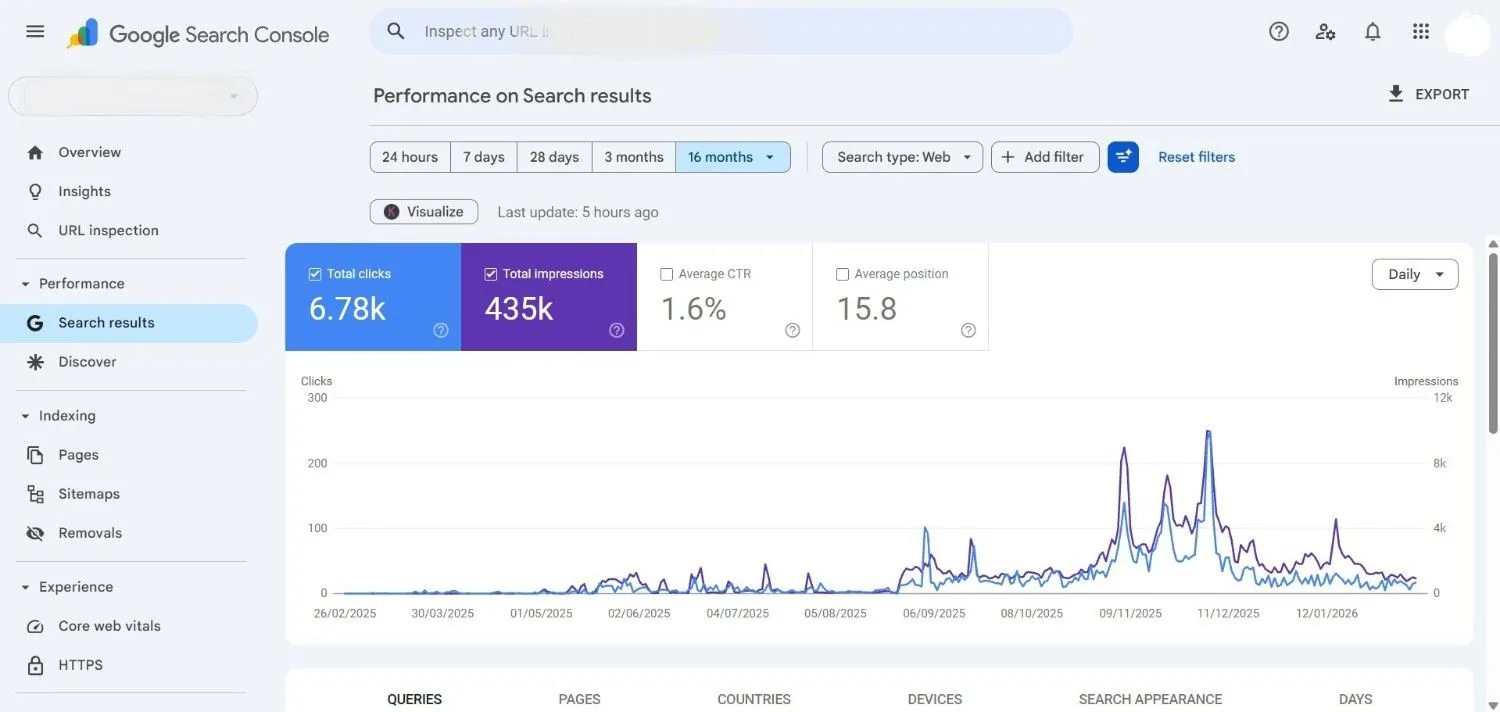
Google Search Console is a free tool provided by Google that helps website owners monitor, maintain, and troubleshoot their site’s presence in Google Search results. It acts as a direct communication channel between your website and Google.
What Is Its Work?
- Monitor website indexing status
- Track search queries and keyword performance
- Identify crawl errors and technical issues
- Submit sitemaps for faster indexing
- Check mobile usability and Core Web Vitals
- Detect security issues or manual penalties
2. Set Up Google Analytics
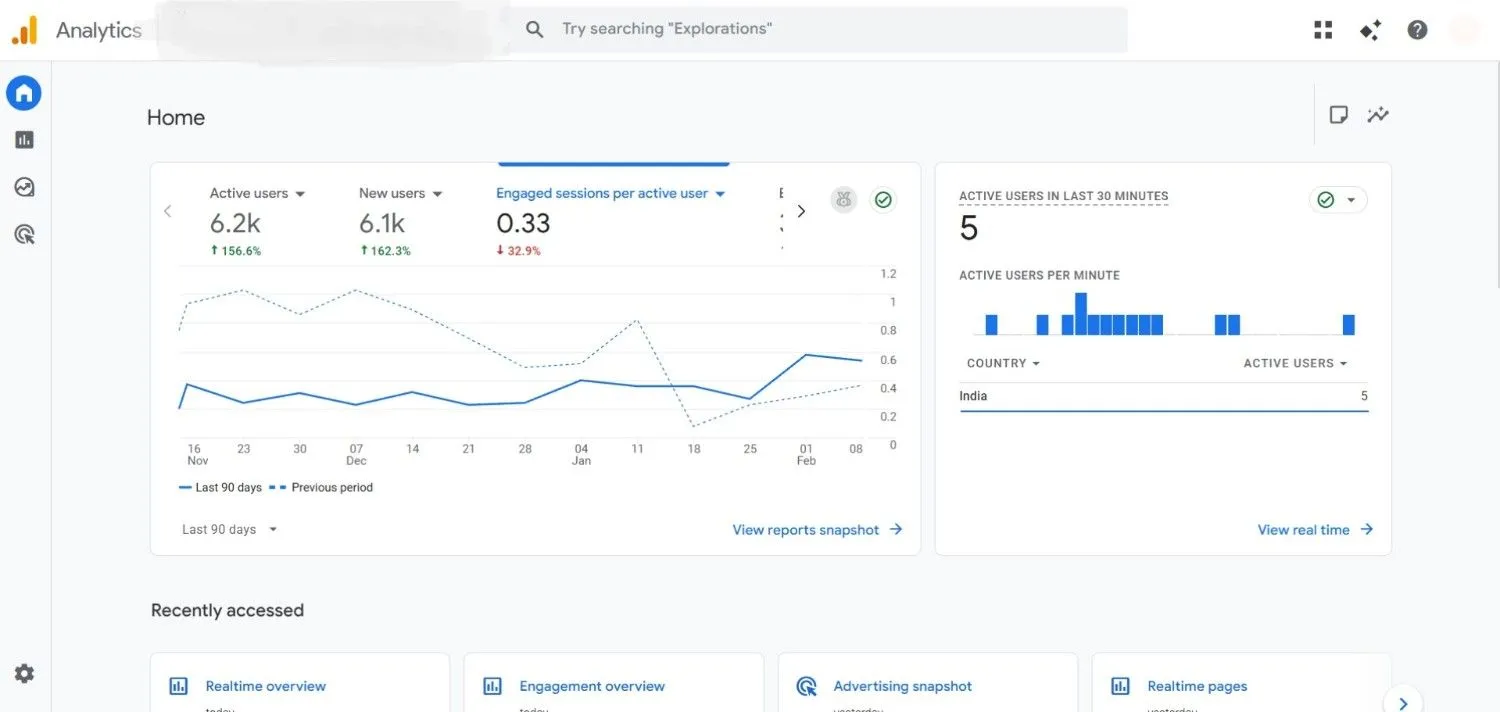
Google Analytics is a powerful tracking platform from Google that helps you understand how visitors interact with your website. Instead of guessing what users are doing, it provides clear data and measurable insights.
What Does It Do?
- See how many people visit your website
- Identify where your traffic comes from (search, social, ads, direct, referral)
- Understand which pages users visit most
- Measure how long visitors stay on your site
- Track conversions from submissions, calls, or purchases
- Analyze device usage (mobile, desktop, tablet)
3. Install an SEO Plugin
An SEO plugin is a tool that helps you optimize your website content without needing advanced technical knowledge. If you are using WordPress, plugins like Yoast SEO or Rank Math simplify on-page and technical SEO tasks.
What Does It Do?
- Optimize title tags and meta descriptions
- Add focus keywords to pages and posts
- Generate XML sitemaps automatically
- Implement basic schema markup
- Improve content readability
- Control indexing settings (noindex, canonical URLs)
4. Create Sitemap
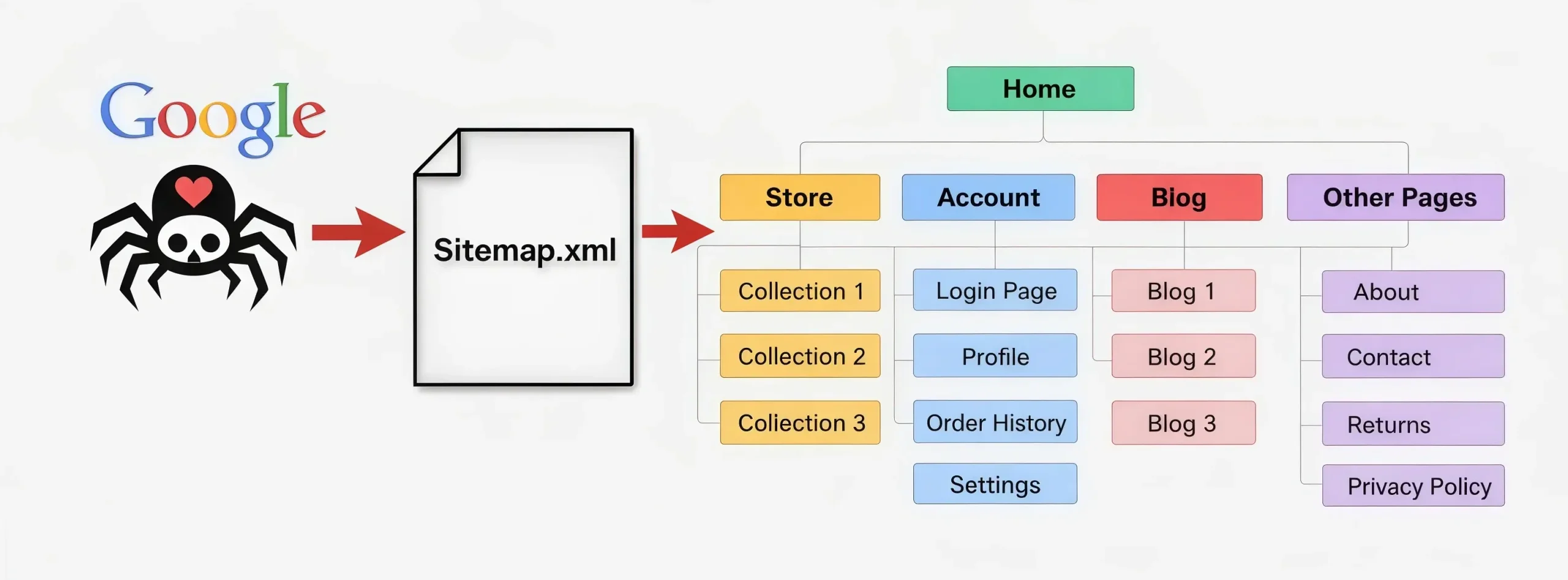
A sitemap is a structured file (usually in XML format) that lists all the important pages of your website. It helps search engines understand your site structure and discover new or updated content faster.
A sitemap acts like a roadmap that guides search engine bots to your key pages.
What Does It Do?
- Inform search engines about important pages
- Speed up the indexing of new content
- Highlight updated pages
- Improve crawling efficiency
- Organize large websites properly
5. Create Robots.txt File
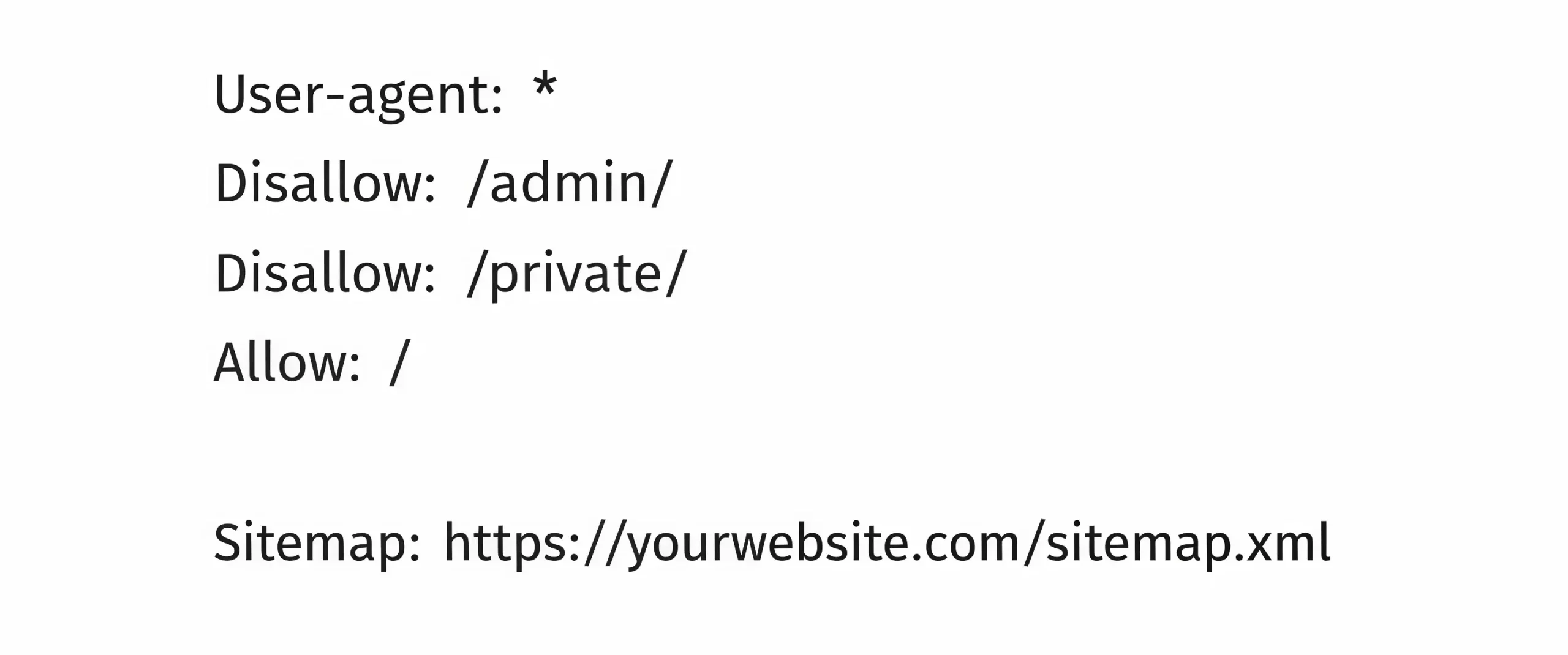
A robots.txt file is a simple text file placed in your website’s root directory. It tells search engine crawlers which pages or sections they are allowed to crawl and which they should ignore.
What Does It Do?
- Control crawler access to specific pages
- Prevent indexing of duplicate or private content
- Protect admin or backend sections
- Guide bots to your sitemap location
B. Your On-Page SEO Checklist
On-page SEO is the core of an SEO-friendly website. It directly affects search rankings, user engagement, and conversion rates. When your pages are properly optimized, search engines understand your content better, and users enjoy a smoother experience.
1. Make UI/UX Proper
UI (User Interface) = How your website looks
UX (User Experience) = How your website works and feels for users
What it means:
- Clean and modern design
- Easy navigation (menu, buttons, links)
- Mobile-friendly layout
- Clear call-to-action (Contact, Buy, Enquiry)
- Readable text and proper spacing
Why it’s important:
- Visitors stay longer on your site
- Lower bounce rate
- Builds trust and professionalism
2. Choose Proper Keywords
A keyword is a word or phrase that people type into Google to search for something. Every page must target one primary focus keyword and several related keywords.
Key Importance:
- Choose keywords with a smart strategy
- Use a keyword planner tool for research
- Target low-competition keywords
- Start with low search volume and low competition keywords
- Helps your website rank faster and get initial traffic
Place keywords naturally in headings, introductions, subheadings, and body content. Avoid forced placement.
3. Create Useful, Actionable Content
Content is the strongest pillar of an SEO-friendly website. High-quality content not only improves rankings but also builds trust, authority, and conversions.
Search engines prioritize content that genuinely solves user problems, not content written only to rank.
Why It Matters for SEO
- Improves search rankings through topical depth
- Increases user trust and authority
- Reduces bounce rate
- Encourages backlinks and social sharing
- Boosts conversion rates
What to Avoid
- Thin or low-word-count pages with no depth
- Duplicate or copied content
- Keyword stuffing
- AI-generated content without editing or human experience
- Outdated or misleading information
4. Implement Schema Markup
Schema markup is structured data that helps search engines understand the meaning behind your content.
It can increase your chances of getting:
- Rich snippets
- FAQ schema results
- Star ratings in search results
- Higher click-through rates (CTR)
Schema does not directly improve rankings, but it enhances visibility and improves search appearance. Structured data strengthens your SEO strategy and builds credibility.
C. Your Technical SEO Checklist
Technical SEO is the backbone of a website. Even if your content is excellent, search engines cannot rank it properly if they cannot crawl, index, and evaluate your pages efficiently.
1. Check Page Loading Speeds
Website loading speed strongly affects your Google ranking, user experience, and sales. Google data shows that over 50% of mobile visitors exit a site if it doesn’t load within 3 seconds.
Why Speed Matters
- Faster websites reduce bounce rate
- Improve user satisfaction
- Increase conversions
- Strengthen Core Web Vitals performance
- Support higher search rankings
How to Improve Speed
- Compress and properly size images
- Enable browser caching
- Minimize CSS, JavaScript, and HTML files
- Choose high-performance hosting
- Remove unnecessary plugins
Recommended Speed Optimization Tools
- Google PageSpeed Insights
- GTmetrix
- Lighthouse
2. Check and Fix 404 Errors
A 404 error appears when a webpage is deleted, moved, or the URL is entered incorrectly. When search engines or users land on a missing page, it creates a poor experience and weakens your technical SEO structure.
Why 404 Errors Are Harmful
- Damage user trust
- Increase bounce rate
- Reduce crawl efficiency
- Weaken SEO authority
What to Fix Regularly
- 404 error pages
- Broken internal links
- Redirect chains
- Duplicate URLs
- Incorrect canonical tags
Tools to Detect Technical Errors
- Google Search Console (Coverage Report)
- Screaming Frog SEO Spider
- Ahrefs Site Audit
D. Your Off-Page SEO Checklist
Off-page SEO focuses on activities outside your website that improve authority, trust, and search rankings. Search engines evaluate how other websites refer to and mention your brand to measure credibility.
1. Build a Strong Link-Building Strategy
Backlinks (links from other websites to your site) are one of the most powerful ranking factors. According to Google, links help search engines discover new pages and determine content authority.
Why Backlinks Matter
- Increase domain authority
- Improve search rankings
- Drive referral traffic
- Build industry credibility
- Strengthen brand trust
Focus on Quality Sources
Prioritize backlinks from:
- Relevant industry directories
- Niche-related blogs
- News websites and PR mentions
- High-authority and trusted domains
- Business associations and local listings
Not Getting Results from Your Website?
Let Experts Handle Your SEO the Right Way
If you’re not able to manage all the SEO details yourself, it’s time to connect with a professional team. IMI Advertising, a leading SEO company in Ahmedabad, can optimize your website to improve Google visibility, attract real users, and help you generate genuine inquiries and sales.
Final Thoughts
Building an SEO-optimized website is not about tricks, it’s about structure, strategy, and consistency. From technical setup to content optimization and link building, every step matters.
If you focus on user experience, high-quality content, and technical precision, your website can rank competitively and drive measurable business growth.
FAQs:
An SEO-ready website has proper technical setup (sitemap, robots.txt, SSL), mobile responsiveness, fast loading speed, and keyword-optimized structure before publishing content.
Mobile optimization is important because Google uses mobile-first indexing, meaning it ranks your site based on its mobile version performance.
Backlinks help build authority and trust. For a new website, quality backlinks from relevant sources can significantly improve visibility and ranking speed.
On-page SEO focuses on content, keywords, and optimization within pages, while technical SEO improves backend structure, speed, indexing, and crawlability.
Typically, it takes 3 to 6 months to see noticeable ranking improvements, depending on competition, content quality, and SEO consistency.
Get in touch with us for
Digital Marketing Services
09313100658
Available From 09:30 – 06:30
Email: support@imiadvertising.com